DoorLoop Review: The Property Management Platform Landlords Actually Like Using

Here’s a strange thing about property management software: most of it gets tolerated, not liked. Landlords use it because they have to, not because they enjoy it. So when a platform shows up with a 4.8 out of 5 rating on G2 across more than 200 reviews — and 95% of those reviewers are small businesses, not enterprise portfolios — it’s worth asking what’s actually going on. That’s DoorLoop’s situation right now, and it’s a genuinely unusual place for property management software to be.
Let’s dig into what’s behind that rating, what DoorLoop actually does, what it costs, and whether the reasons people like it apply to your specific portfolio.
What Is DoorLoop?
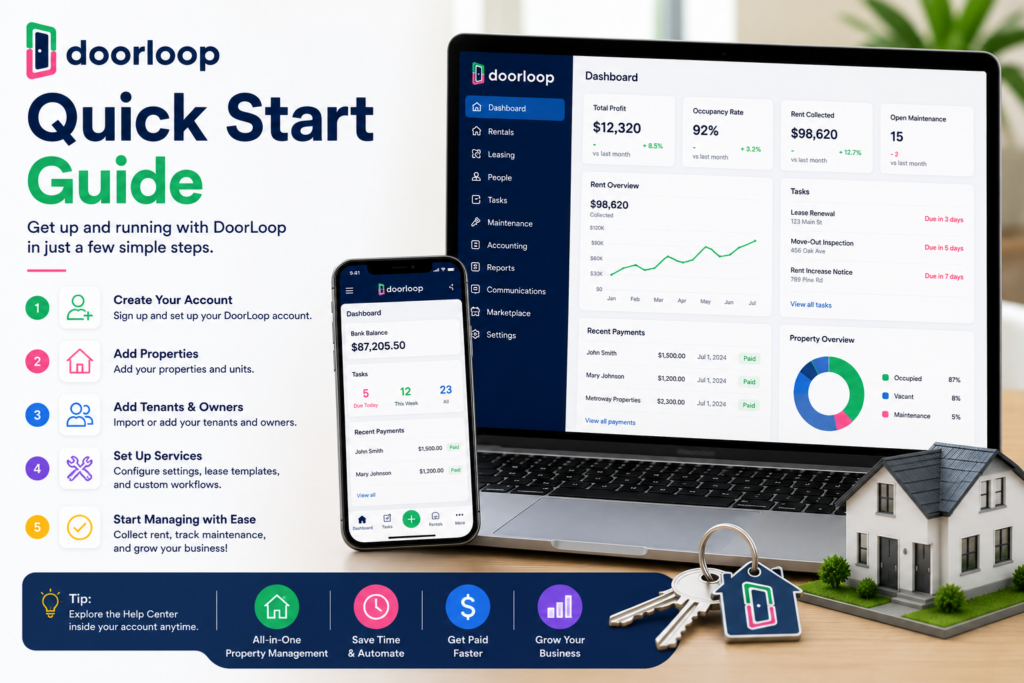
DoorLoop is a cloud-based property management platform covering the full operational and financial side of running rental properties — leasing, rent collection, maintenance, and accounting, all from one system. It handles applications, e-signed lease agreements, tenant screening, and a self-service tenant portal on the leasing side, and a genuinely robust accounting suite on the financial side — chart of accounts, rent roll, custom reports, bank reconciliation, and bill pay, built specifically for the complexity of multi-property accounting rather than adapted from generic bookkeeping software.
The platform supports residential, commercial, community associations, affordable housing, mobile home communities, and student housing — a broader range than most competitors at this price point. One specific differentiator worth calling out: DoorLoop supports HOA and condo management with dues tracking, violation management, and board portals, which many competitors in this price range simply don’t offer.
Onboarding is a real point of pride for the company. Every customer gets a dedicated account manager, a migration team that imports your data from Excel or a previous platform, and free live training. There’s also an in-app AI assistant, nicknamed “Gary” by users, that answers day-to-day questions about how to use specific features — reviewers consistently mention Gary as genuinely helpful, not a gimmick.
One thing worth knowing before you go looking for a free trial: there isn’t one. DoorLoop offers a demo, not a self-serve trial, so you’ll need a call with their sales team to get started. There is a 30-day money-back guarantee on all plans, though, which softens that commitment somewhat.
DoorLoop Is Best For
- Small-to-midsize landlords and property management teams outgrowing free tools like TurboTenant
- HOA and condo managers needing dues tracking, violations, and board portals built in
- Businesses wanting full accounting depth (bank reconciliation, custom reports) alongside leasing tools
- Property managers who value white-glove onboarding and ongoing support
Not recommended for:
- Landlords with only 1-2 properties, where the cost is harder to justify against free alternatives
- Businesses prioritizing an established, long-track-record vendor over a newer, faster-moving one
- Anyone wanting to test the platform without first booking a sales call
- Teams needing highly customized reporting or multi-property display options right out of the box
At a Glance
| Best For | Small-to-midsize landlords and property managers |
| Starting Price | $59/month annual (up to 20 units); $69/month billed monthly |
| Free Trial | No self-serve trial — demo required; 30-day money-back guarantee |
| Mobile App | iOS and Android |
| AI Features | In-app AI assistant (“Gary”) for day-to-day platform questions |
| Ease of Use | High — 4.8/5 on G2 across 215 reviews |
| Integrations | QuickBooks Online sync (Pro plan and above) |
Pros & Cons
Pros
- 4.8/5 G2 rating with 95.3% of reviewers coming from small businesses
- Dedicated account manager and migration team for every customer, not just enterprise clients
- Full accounting suite built specifically for multi-property complexity
- HOA/condo support (dues, violations, board portals) is rare at this price point
- Live, personalized Zoom onboarding consistently praised in reviews
Cons
- No self-serve free trial — you have to book a demo to get started
- Pro plan, the most popular tier, costs meaningfully more than Starter
- Some fees (e-signature, ACH payments) apply even on paid plans
- A handful of reviewers want more report customization and better multi-property display options
- No option for tenants to pay rent in cash through locations like 7-Eleven or Western Union
DoorLoop Review: What Reviewers and Real Users Are Saying
The numbers here are genuinely striking, and worth sitting with for a second. SelectHub’s aggregated analysis puts DoorLoop’s user satisfaction at 99% based on 192 reviews across four review sites. G2’s data shows a 4.8 out of 5 rating from 215 reviewers, with 95.3% of those reviewers coming from small businesses specifically — in a head-to-head comparison against AppFolio (a well-established competitor rated 4.6/5), DoorLoop actually edges it out on raw rating, which is a notable result for a younger platform going up against an incumbent.
What’s behind those numbers? Capterra’s review data points to ease of use and rent tracking as the standout benefits reviewers mention most, alongside genuine praise for the onboarding process — one reviewer specifically called out the Zoom setup calls where the DoorLoop team walks you through the software personally, and mentioned Gary, the AI assistant, as consistently helpful when questions come up outside those calls. Another reviewer’s comment is worth including verbatim in spirit: they’d switched away from AppFolio specifically because of what they described as the worst customer service they’d ever experienced, especially given the price — a pointed, specific comparison that shows up more than once in the review data.
Not everything is glowing, and the honest reviews say so. Capterra’s data shows reporting and payment processing as the two areas with the most friction — some reviewers find reports easy to generate and genuinely useful for decision-making, while others specifically wish for more customization and better multi-property display options. GetApp’s breakdown of the accounting feature confirms real value (P&L statements, multi-entity management, easy reconciliation) alongside occasional, specific complaints about chart-of-accounts setup and transaction entry quirks.
ThePropertyCEO’s detailed review offers maybe the clearest positioning of anyone: DoorLoop fills the gap between free tools and enterprise platforms, with a polished interface, solid features, and reasonable pricing — the sweet spot specifically for a growing property management company that’s outgrown TurboTenant but isn’t ready for AppFolio’s pricing and complexity. Their honest risk assessment is worth repeating: DoorLoop is a younger company, so you’re betting somewhat on continued execution — though they note DoorLoop has shipped updates and expanded features consistently so far. Their specific advice, if you’re going to commit: get the Pro plan, not Starter, since Starter is described as too limited for serious property management once you’re managing real volume.
Technology Evaluation Centers’ review lands on a similar, balanced note: DoorLoop excels for managers of small-to-medium portfolios needing core functionality out of the box, while larger portfolios or highly custom workflow needs may require more evaluation — with a direct recommendation to talk through your specific needs with DoorLoop’s support team before committing, which multiple reviews independently describe as genuinely responsive.
Pricing
| Plan | Price | Best For |
|---|---|---|
| Starter | $59/month (annual) / $69/month (monthly), up to 20 units | New or small landlords — scalable up to 160 units |
| Pro | $119/month (annual) / $139/month (monthly), up to 20 units | Most popular tier — adds advanced accounting, live bank connect, QuickBooks sync |
| Premium | Custom pricing | Larger portfolios needing the fullest feature set |
Hidden costs to watch for: Starter is genuinely limited — no phone or Zoom support, no advanced customizable dashboards, no API access — and multiple reviewers specifically recommend skipping straight to Pro if you’re managing real volume. Even on paid plans, certain features like e-signature and ACH payments carry additional fees, so get an itemized breakdown before assuming your monthly plan cost is your total cost. And remember: there’s no self-serve trial, so budget time for a sales call before you can even start testing.
Setup Guide: Getting Your Portfolio onto DoorLoop
1. Import Your Property and Tenant Data First
- Migrate existing property, unit, and tenant records before going live
- Clean data before import to avoid duplicate tenant or lease records
- Spot-check a sample of imported leases against your source records Payoff: a clean data import prevents rent tracking errors that are painful to untangle mid-lease-cycle.
2. Set Up Online Rent Collection
- Connect your bank account for ACH rent collection
- Set up autopay options and send tenants clear instructions for enrolling
- Test a payment cycle with one unit before rolling out to your full portfolio Payoff: online collection is DoorLoop’s biggest time-saver, but only once tenants are actually enrolled.
3. Configure Maintenance Request Workflows
- Set up categories for maintenance requests so they route to the right vendor or staff member
- Enable tenant-submitted requests through the portal
- Test the notification flow to confirm requests reach the right person immediately Payoff: a working maintenance workflow is what tenants notice first — get it right before launch.
4. Set Up Accounting and Owner Reporting
- Configure your chart of accounts to match your property management structure
- Set up automated owner statements if managing on behalf of property owners
- Reconcile your first month manually to confirm accounting accuracy Payoff: accounting errors compound fast in property management — catch them in month one.
5. Roll Out the Tenant Portal in Stages
- Launch the portal with one property before rolling out to your full portfolio
- Send clear onboarding instructions to tenants for the portal and autopay
- Gather feedback from the pilot property before a full rollout Payoff: a staged rollout catches communication or setup gaps before they affect your entire tenant base.
Getting Value Fast: Your First Week Checklist
- Complete your data migration with the dedicated team before doing anything else — this sets the foundation for everything after.
- Attend at least one live training session rather than trying to self-teach the platform.
- Send one message to Gary, the AI assistant, with a real setup question to see how useful it actually is for your workflow.
- Turn on rent collection for one property and run through a real transaction to confirm fees and timing match what you expect.
- Generate one financial report and compare it against what you were using before, to judge whether the reporting depth meets your needs.
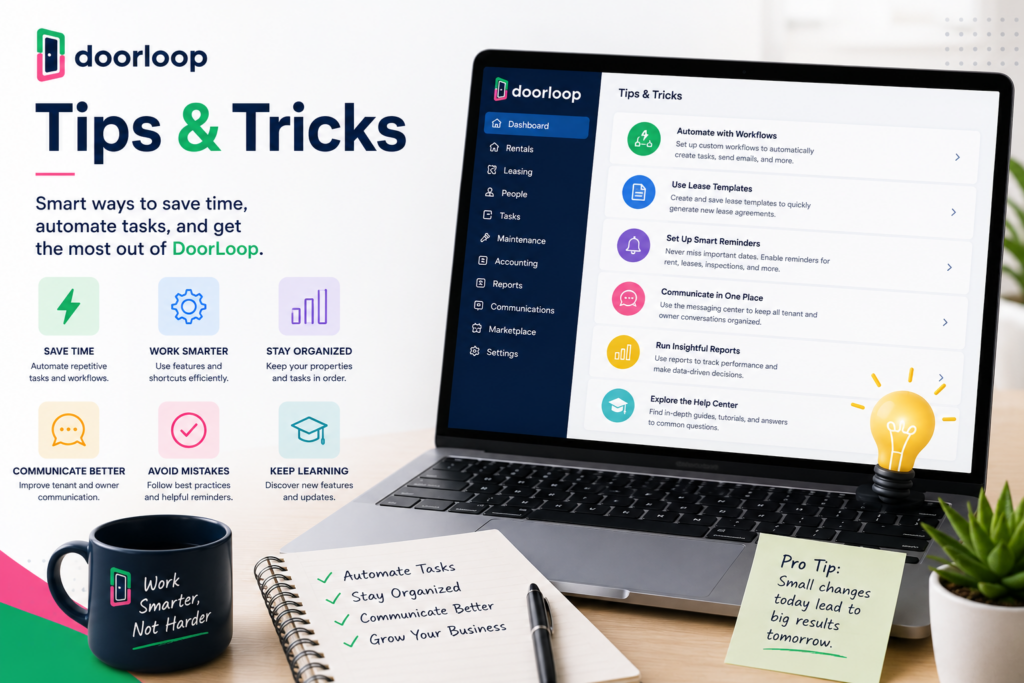
Tips & Tricks for Growing Your Business with DoorLoop
1. Use Recurring Tasks for Preventive Maintenance
- Set filter changes, inspections, and seasonal tasks on a fixed schedule per property
- Let the system handle reminders instead of relying on memory
- Adjust intervals as you learn what each property actually needs Payoff: turns maintenance from something you have to remember into something that just happens.
2. Push Tenants Toward the Self-Service Portal
- Route payments, maintenance requests, and lease documents through the portal by default
- Discourage direct calls and texts for anything routine
- Document everything through the platform instead Payoff: fewer interruptions for you, better documentation if a dispute ever comes up.
3. Reconcile Monthly, Not Just Around Tax Season
- Run bank reconciliation every month without skipping
- Catch discrepancies while the transactions are still fresh in your memory
- Don’t let entries pile up unreviewed for months Payoff: given the reported friction around reporting, staying current makes any error far easier to catch and fix.
4. Actually Use Gary for Day-to-Day Questions
- Ask the AI assistant instead of digging through help documentation
- Treat it as a real shortcut, not a novelty feature
- Escalate to human support if Gary can’t resolve something specific Payoff: reviewers consistently call this a genuine time-saver for everyday platform questions.
5. Push Back on Reporting Limits Instead of Working Around Them
- Don’t assume you’re stuck with default report views
- Bring specific customization requests directly to DoorLoop’s support team
- Track whether requested features show up in future updates Payoff: DoorLoop’s roadmap has responded to user requests before — a specific ask is more likely to get addressed than silent frustration.
6. Skip Starter If You’re Managing Real Volume
- Compare what Starter excludes (phone support, advanced dashboards, API access) against your actual needs
- Go straight to Pro if you’re past a handful of units
- Reassess your tier as your portfolio grows past 20 units Payoff: multiple independent reviews agree Starter is too limited for serious, ongoing property management — save yourself the mid-year upgrade.
Alternatives to DoorLoop
Choose TurboTenant if you have only 1-2 properties and want a free platform rather than a paid one.
Choose AppFolio if you specifically want the longest-established, most proven platform, and you’re less price-sensitive than a small landlord typically is.
Choose Buildium if stability and a long track record matter more to you than DoorLoop’s faster pace of feature development.
Choose DoorLoop if you’ve outgrown free tools and want a polished, well-supported platform with full accounting depth, without paying enterprise-level prices.
Final Verdict
DoorLoop’s 4.8/5 G2 rating and 99% satisfaction figure aren’t just marketing numbers — dig into the actual reviews and the reasons are specific and consistent: genuinely helpful onboarding, an AI assistant people actually use, and accounting depth that holds up for real property management, not just simple rent tracking. The honest gaps — reporting customization, some plan-gated fees, no self-serve trial — are real, but none of them contradict the core reputation. For a small-to-midsize landlord who’s outgrown a free tool like TurboTenant and isn’t ready for AppFolio’s price tag, DoorLoop is one of the most consistently well-reviewed places to land.
Frequently Asked Questions
Does DoorLoop offer a free trial?
No — DoorLoop requires a demo with their sales team rather than offering a self-serve free trial. All plans do come with a 30-day money-back guarantee, though.
Is DoorLoop good for HOA or condo management?
Yes — this is a specific differentiator. DoorLoop supports dues tracking, violation management, and board portals, features many competitors at this price point don’t offer.
How much does DoorLoop cost?
Starter runs $59/month billed annually (or $69/month monthly) for up to 20 units, scaling to 160 units. Pro, the most popular plan, runs $119/month annually (or $139/month monthly) and adds advanced accounting and QuickBooks sync.
Is DoorLoop better than AppFolio?
In direct G2 comparison data, DoorLoop actually holds a slightly higher rating (4.8 vs. 4.6) and higher small-business reviewer concentration. AppFolio remains the more established, longer-track-record option, which matters if platform stability outweighs price for you.