
DoorLoop Review: The All-in-One Property Management Platform Landlords Actually Enjoy Using
Managing rental properties without the right software means living in spreadsheets, sticky notes, and a phone full of tenant texts about a leaking faucet. DoorLoop was built to replace all of that with one cloud-based system — leasing, rent collection, maintenance, accounting, and tenant communication in a single login. Since launching, it’s grown into one of the most consistently well-reviewed platforms in the property management category, particularly among landlords and small teams who tried an established competitor first and found it either too clunky or unwilling to work with a smaller portfolio.
That’s a strong reputation, but no software is universally perfect, and the reviews are specific about where DoorLoop shines and where it still shows its relative youth. In this article, we’ll cover what DoorLoop actually does, what professional reviewers and real landlords say about it, how to get your portfolio set up, and the tips that help you get the most out of the platform.
What Is DoorLoop and Who Is It For?
DoorLoop is a cloud-based property management platform built to run the full operational and financial side of managing rental properties. It covers leasing and tenant management (applications, e-signed lease agreements, tenant screening, and a self-service tenant portal), online rent collection with automated reminders and late fees, maintenance request handling and vendor coordination, and a genuinely robust accounting suite — chart of accounts, rent roll, custom reports, bank reconciliation, and bill pay — built specifically for the complexities of multi-property accounting rather than adapted from generic bookkeeping software.
The platform is designed to scale across property types: residential, commercial, community associations, affordable housing, mobile home communities, and student housing are all explicitly supported, which is part of why it appeals to landlords with mixed portfolios. DoorLoop also emphasizes built-in compliance tools and secure document management, and the company highlights an in-app AI assistant (nicknamed Gary by users) that helps with day-to-day questions about how to use specific features.
Onboarding is a notable differentiator: DoorLoop provides a dedicated account manager for every customer, a migration team that imports your data from Excel or a previous platform, and free live training for your whole team, with the company’s stated goal of getting new customers live in days rather than months. Support is available by email and phone, Monday through Friday, 9am–6pm EST.
Pricing runs on three tiers — Starter, Pro, and Premium — with published rates starting around $69/month, billed based on usage (typically unit count), and no free plan. That puts DoorLoop above some scrappier, cheaper competitors, but the company’s pitch is that the all-in-one design eliminates the cost and hassle of running four or five separate tools, which several long-time reviewers say matches their real-world experience.
DoorLoop Review: What Reviewers and Real Landlords Are Saying
We looked at professional evaluations from Capterra, G2, Software Advice, Technology Evaluation Centers, and independent reviewers at Landlory and The Close, alongside verified customer reviews across those same platforms. The pattern is unusually positive for software in this category — DoorLoop draws some of the warmest reviews among property management platforms — with a few consistent, specific caveats worth taking seriously.
The Professional Verdict
Capterra’s editorial summary calls DoorLoop a practical choice for small teams that want to consolidate property, lease, and tenant management into one system, noting an easy-to-navigate interface and well-rated rent tracking tools, while flagging trade-offs in reporting flexibility and payment processing speed — concluding that for teams managing multiple units, the flat-rate pricing and centralized workflows can justify the cost. Across 703 Capterra reviews, sentiment runs 98% positive, an unusually lopsided result for enterprise software.
Landlory’s independent review frames DoorLoop’s core advantage precisely: it delivers the depth of a full platform while keeping a learning curve a solo operator can actually clear, with support that’s consistently well-reviewed where established incumbents draw complaints — resulting in a much faster time-to-productive than older enterprise tools typically demand. The review recommends it specifically for smaller teams wanting full-platform depth without an enterprise ramp-up, and for landlords whose accountant expects clean QuickBooks compatibility. Technology Evaluation Centers similarly concludes DoorLoop excels for managers of small-to-medium portfolios needing core functionality out of the box, while suggesting larger portfolios with highly custom workflow needs discuss specifics with DoorLoop’s support team before committing.
Worth noting: one independent comparison piece cautions that DoorLoop’s strong Capterra and G2 scores include incentivized reviews (a common industry practice disclosed on both platforms), and recommends cross-checking sentiment on Trustpilot, the BBB, and Reddit before signing a contract — reasonable advice for evaluating any heavily-reviewed SaaS product, not a DoorLoop-specific red flag.
What Landlords Love
Ease of use relative to platform depth. This is the most consistent theme across every source. Reviewers who tried established competitors first — including one Capterra reviewer who noted a larger incumbent “refused to work with us as a small business” — describe DoorLoop as easy to implement and easy to train new hires on, without sacrificing the feature depth of leasing, maintenance, accounting, and marketing in one system.
Responsive, genuinely helpful support. DoorLoop’s customer support consistently draws praise, with G2 and Capterra reviewers citing well-supported onboarding, live Zoom walkthroughs before go-live, and fast answers by email or the in-app AI assistant. This stands out specifically because it’s an area where reviewers say larger incumbents fall short.
Accounting that actually fits property management. Reviewers highlight DoorLoop’s accounting suite as a real differentiator from generic tools like QuickBooks, which weren’t built for multi-property complexity — DoorLoop supports both a full built-in accounting suite and QuickBooks syncing, giving landlords and their accountants flexibility.
Fast onboarding and migration support. A dedicated migration team importing data from Excel or a previous platform, combined with free live training, means new customers consistently report going live in a matter of days rather than the months longer implementations can take with legacy competitors.
Modern, well-built interface. Multiple Capterra reviewers specifically praise the platform’s architecture — described as fast, robust, and well-built — as a meaningful improvement over older, clunkier incumbent software.
What Landlords Complain About
No free plan and usage-based pricing that adds up. Starting around $69/month with no free tier, DoorLoop costs more than some scrappier competitors like Innago, which offers a free plan and edges out DoorLoop slightly on G2’s overall satisfaction score (4.9 vs. 4.8). Reviewers note DoorLoop may not be the best fit for landlords with only one or two properties, where the cost is harder to justify.
Payment processing and reporting friction. Capterra’s editorial review specifically flags slow and cumbersome payment workflows as a recurring pain point, alongside requests for more report customization and better multi-property display options in reporting.
A newer platform still filling in gaps. Several reviewers note that because DoorLoop is younger than legacy competitors like AppFolio or Yardi, some features are newer or still being built out — one reviewer specifically mentioned expense tracking by unit as a recent addition rather than a long-established feature.
Inconsistent experiences at scale. A minority of reviews — notably on Capterra’s later review pages — describe frustration with customer support responsiveness and perceived value for the price, a reminder that experience can vary by account size, use case, or timing, even on a platform with strong average ratings.
The Bottom Line
DoorLoop’s reputation is built on a specific, credible claim: full-platform depth without the punishing learning curve or customer service frustration that reviewers commonly report with older, established competitors. The trade-offs are equally specific — no free plan, pricing that only pencils out once you have a real portfolio, and a few workflow rough edges (payment processing speed, reporting customization) that a newer platform is still smoothing over. For a small-to-midsize landlord or property management team ready to consolidate multiple tools into one, the reviewer consensus is clearly favorable.
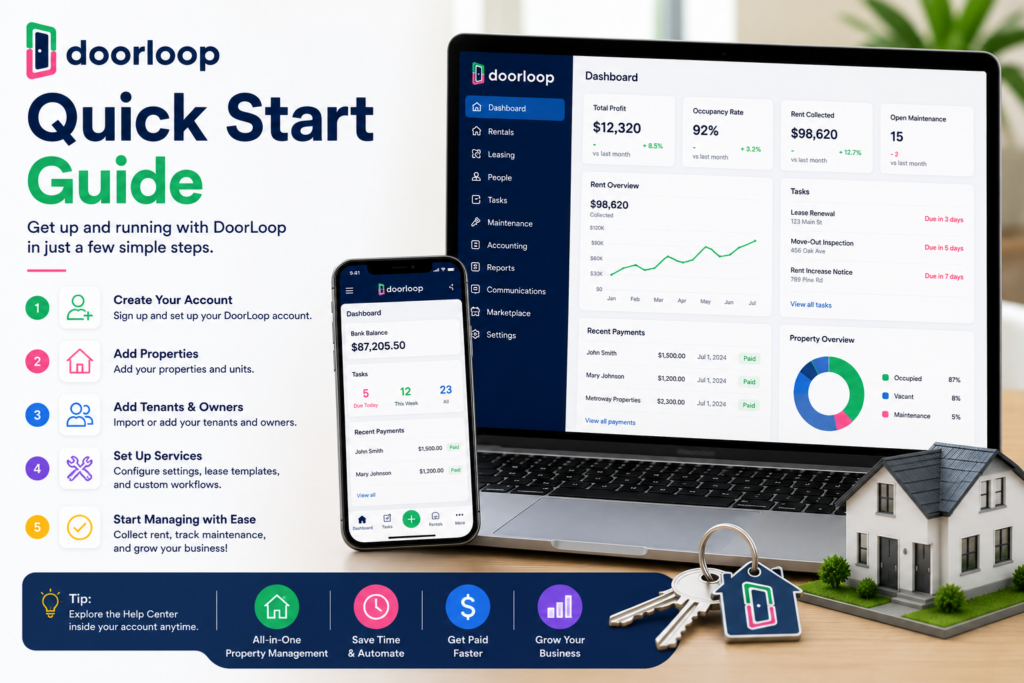
Setup Guide: Getting Your Portfolio onto DoorLoop
Step 1: Book a Demo and Choose Your Tier
Since pricing is usage-based across Starter, Pro, and Premium tiers, start with a demo to get an accurate quote for your unit count and confirm which tier includes the accounting depth and compliance tools your portfolio actually needs.
Step 2: Let the Migration Team Import Your Data
Rather than manually re-entering your properties, tenants, and lease history, use DoorLoop’s dedicated migration team to import from Excel or your previous software. This is the single biggest reason reviewers report going live in days rather than months — don’t skip it in favor of a DIY setup.
Step 3: Set Up Your Chart of Accounts and Bank Connections
Configure your accounting foundation early — chart of accounts, bank account connections, and whether you’ll run full accounting natively in DoorLoop or sync with QuickBooks. Getting this right at the start avoids reconciliation headaches later.
Step 4: Load Properties, Units, and Leases
Add your properties and units, then either import active leases through migration or set up new lease agreements using DoorLoop’s e-signature tools. Configure your rental application settings and terms and conditions per property type if your portfolio includes a mix (residential, commercial, community association, etc.).
Step 5: Turn On Online Rent Collection
Enable rent collection with automated reminders and late fee rules so DoorLoop starts doing the chasing instead of you. This is consistently the feature landlords say delivers the fastest, most obvious time savings.
Step 6: Set Up the Tenant Portal and Maintenance Workflow
Activate the tenant portal so residents can pay rent, submit maintenance requests, and communicate directly through the system. Configure how maintenance requests route to you or your vendors, and set up recurring maintenance tasks (filter changes, inspections, landscaping) on a schedule.
Step 7: Attend Your Free Training
Take advantage of DoorLoop’s live virtual training for your team, or work through the training video library, so your staff learns the platform properly rather than piecing it together through trial and error.
Step 8: Run Your First Full Reporting Cycle
Generate your first month of reports — rent roll, cash flow, custom property reports — and review them with your accountant or bookkeeper to confirm everything reconciles correctly before you rely on the system fully.
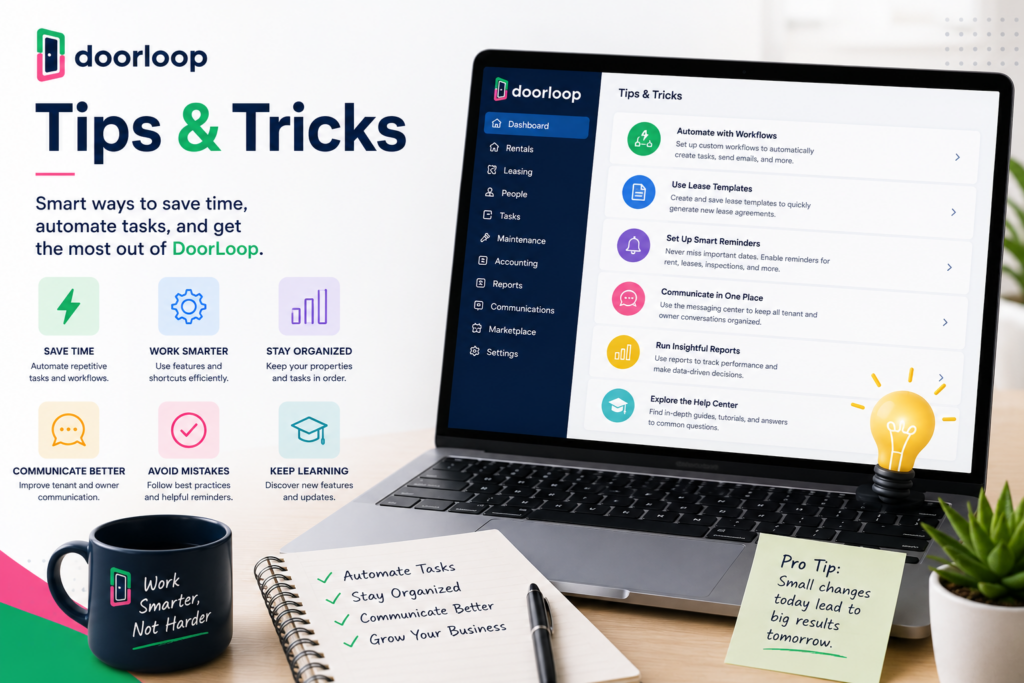
Tips & Tricks: Getting More from DoorLoop
Use Recurring Tasks to Automate Routine Property Care
Set up recurring maintenance tasks — filter changes, fire detector checks, landscaping, trash removal — on whatever interval makes sense per property. This turns preventive maintenance from something you remember (or forget) into something the system handles automatically.
Let Tenants Self-Serve Through the Portal
Encourage tenants to use the portal for payments, maintenance requests, and lease document access rather than calling or texting you directly. Reviewers consistently cite this as a major quality-of-life improvement — fewer interruptions, better documentation, faster resolution.
Reconcile Monthly, Not Just at Tax Time
Use DoorLoop’s bank reconciliation tools every month rather than letting transactions pile up. Given that reviewers flag reporting and payment workflow as areas with some friction, staying current makes any discrepancy far easier to catch and fix while it’s still fresh.
Lean on the AI Assistant for Day-to-Day Questions
Rather than digging through documentation for how to complete a specific task, use the in-app AI assistant for quick how-to answers — reviewers specifically call this out as a genuinely useful time-saver for day-to-day platform questions.
Customize Rental Applications Per Property Type
If your portfolio spans residential, commercial, or community association properties, take advantage of DoorLoop’s ability to customize application settings and terms and conditions per applicant type rather than using one generic application for everything.
Push Back on Reporting Gaps with Support
Since report customization and multi-property display are known friction points, don’t assume you’re stuck with the default views — reviewers who engaged DoorLoop’s responsive support team report getting workable solutions, and the company’s feature roadmap is explicitly driven by user requests.
Revisit Your Tier as Your Portfolio Grows
Because pricing is usage-based, review whether you’re on the right tier as your unit count changes. A portfolio that’s outgrown Starter’s compliance and reporting tools may find Pro or Premium pays for itself in time saved, even with the higher monthly cost.
Final Thoughts
DoorLoop has built a genuinely strong reputation by solving the two things landlords complain about most with established property management software: a steep learning curve and unresponsive support. Reviewers across Capterra, G2, and independent sites consistently confirm both — easy onboarding, a modern interface, and support that shows up when needed. The honest trade-offs are just as clear: no free plan, pricing that favors real portfolios over single-unit landlords, and a handful of workflow rough edges a newer platform is still refining. For a small-to-midsize landlord or property management team ready to consolidate leasing, rent collection, maintenance, and accounting into one system, DoorLoop is one of the most consistently well-reviewed places to start.