
PandaDoc Review: Does This Document Automation Platform Actually Save Sales Teams Time?
Chasing a signature is one of the quiet time-sinks of running a small business. A proposal goes out as a PDF attachment, the client prints it, signs it by hand, scans it back, and three days later you’re still waiting — or worse, the email got buried entirely. PandaDoc set out to collapse that entire back-and-forth into one workflow: build the document, send it, track when it’s opened, collect the signature, and even take payment, all without leaving the platform.
PandaDoc has become one of the most established names in document automation, particularly for sales-heavy small businesses. But reviewers are candid that it’s built with a specific customer in mind, and that customer isn’t every small business. In this article, we’ll cover what PandaDoc actually does, what professional reviewers and real users say about it, how to get your first document workflow running, and the tips that help you get real time savings out of the platform.
What Is PandaDoc and Who Is It For?
PandaDoc is a document automation and e-signature platform built around the full lifecycle of business-critical documents — proposals, contracts, quotes, and forms — from creation through approval, signing, and payment collection, all under one workflow. Rather than treating e-signature as a standalone feature, PandaDoc positions the signature as the last step in a longer document process that starts with building the content itself.
The platform’s core strength is its template library — more than 1,000 templates spanning sales, marketing, HR, and legal use cases — combined with a drag-and-drop editor, a content and image library for reusable assets, and dynamic pricing tables that let sales teams build configurable quotes without manual math. Advanced plans add conditional fields and approval workflows, document bundling, redlining and in-document negotiation, and CRM integrations with platforms like Salesforce and HubSpot, plus payment integrations through Stripe and PayPal. Documents are legally binding under ESIGN and UETA, with full audit trails and role-based access for compliance-conscious teams.
Pricing has genuine range, though reviewers note the pricing page itself can be confusing to parse (more on that below). The Free eSign plan covers basic signing only. Launch, around $9/month billed annually, allows a limited number of documents per year with per-document overage fees. Starter runs about $19/seat/month annually (roughly $35/month billed monthly) for unlimited documents and e-signatures. Business, around $49/seat/month annually, adds CRM integrations, deal rooms, approval workflows, and conditional logic. Enterprise is custom-priced, adding SSO, CPQ, API access, and options like notarization for larger organizations.
The clearest verdict across reviewers: PandaDoc is built primarily for sales teams and growing companies that need advanced workflows and CRM integration — teams sending a meaningful volume of proposals monthly. Freelancers, very small teams, or businesses that only need occasional signatures are consistently steered toward lighter (and cheaper) alternatives.
PandaDoc Review: What Reviewers and Real Users Are Saying
We looked at professional evaluations from Research.com, The Digital Project Manager, TheBusinessDive, Software Advice, and pricing-focused analyses from Docupilot and Prospeo, alongside aggregated user feedback on G2 (4.7/5 across more than 3,400 reviews) and Gartner Peer Insights (4.6/5). The consensus is specific and consistent: PandaDoc earns its strong ratings from the customers it’s built for, and reviewers are unusually direct about who should skip it.
The Professional Verdict
The Digital Project Manager’s review concludes PandaDoc excels in integrations and ease of use, particularly suiting sales and legal teams that need quick document turnaround and streamlined processes — while noting pricing may run high for smaller teams. Research.com’s 2026 evaluation highlights the platform’s flexibility, noting it can scale from small business to enterprise with tiered plans and an API for deeper customization, and specifically calls out customizable templates, deal rooms, and document analytics as differentiators against simpler e-signature tools like DocuSign — concluding PandaDoc suits businesses that need more than signatures alone.
TheBusinessDive’s hands-on review is candid about fit: PandaDoc is a powerful tool with numerous advanced features and high security, but a genuinely limited free version, and for freelancers or very small teams, the platform “may feel like too much.” Prospeo’s pricing-focused breakdown puts it most directly: PandaDoc scores well specifically for proposal-heavy sales teams sending ten or more proposals a month, and its explicit recommendation is to skip PandaDoc if you only need signatures — you’ll overpay relative to simpler alternatives.
What Users Love
Comprehensive document workflow in one platform. Reviewers consistently point to the combination of creation, approval, e-signature, and payment collection as PandaDoc’s core differentiator against pure e-signature tools — you’re not stitching together separate systems for building a proposal and getting it signed.
Deep CRM and payment integrations. Business-tier users highlight native connections to Salesforce, HubSpot, Stripe, and PayPal as genuinely useful, letting sales teams move from CRM record to signed, paid contract without re-entering data across systems.
Large, flexible template library. With more than 1,000 templates spanning sales, marketing, HR, and legal use cases, reviewers note teams can get moving quickly rather than building every document type from scratch.
Advanced workflow tools for growing teams. Approval rules, conditional fields, document bundling, and in-document redlining and negotiation earn specific praise from reviewers evaluating PandaDoc against simpler competitors — these are the features that justify the Business tier for teams that use them.
Responsive implementation support. Multiple reviews note that users can easily reach PandaDoc’s team for help with onboarding and day-to-day questions, which matters for a platform with a genuine learning curve on its advanced features.
What Users Complain About
Confusing, inconsistently presented pricing. This is the most specific and well-documented complaint. Reviewers note the pricing page displays annual rates by default with an easy-to-miss monthly toggle, leading to real confusion between figures like $19 (annual) and $35 (monthly) for the same tier — and even PandaDoc’s own marketing shows inconsistent discount percentages in different places.
Overkill for small or occasional users. The most consistent fit-based criticism: PandaDoc’s broad feature set includes capabilities smaller teams may find unnecessary or overwhelming, and the free version’s real limits (5 documents/month) push light users toward a paid tier faster than expected.
Integration reliability issues. Some users report that integrations with Salesforce, Stripe, and other business apps don’t always work smoothly, creating disconnects between sales and finance teams that depend on that data flowing correctly.
Missed or misdirected emails. A specific, recurring complaint: sent proposals occasionally land in spam folders, which can cause a client to miss a time-sensitive document entirely — worth proactively flagging to clients when sending anything urgent.
Workflow gaps and minor glitches. One reviewer described sending a document with unfilled variable fields with no warning from the system, and expressed interest in more advanced conditional workflows (auto-adding content blocks based on selected products) that may only be available on higher tiers. G2 reviews also include a notable number of mentions of signature-related issues.
Support tiering. While implementation support draws praise, phone support is a paid add-on rather than included by default — worth confirming what support level comes with your specific plan.
The Bottom Line
PandaDoc’s strong aggregate ratings (4.7/5 on G2, 4.6/5 on Gartner) hold up under scrutiny because they’re concentrated among the customer PandaDoc is actually built for: sales and growing teams sending real proposal volume who need CRM integration and workflow automation, not just a signature box. Reviewers are unusually consistent in steering freelancers and light users elsewhere, and equally consistent in flagging the pricing page itself as a real point of confusion worth working through carefully before you commit.
Setup Guide: Getting Your First Document Workflow Live
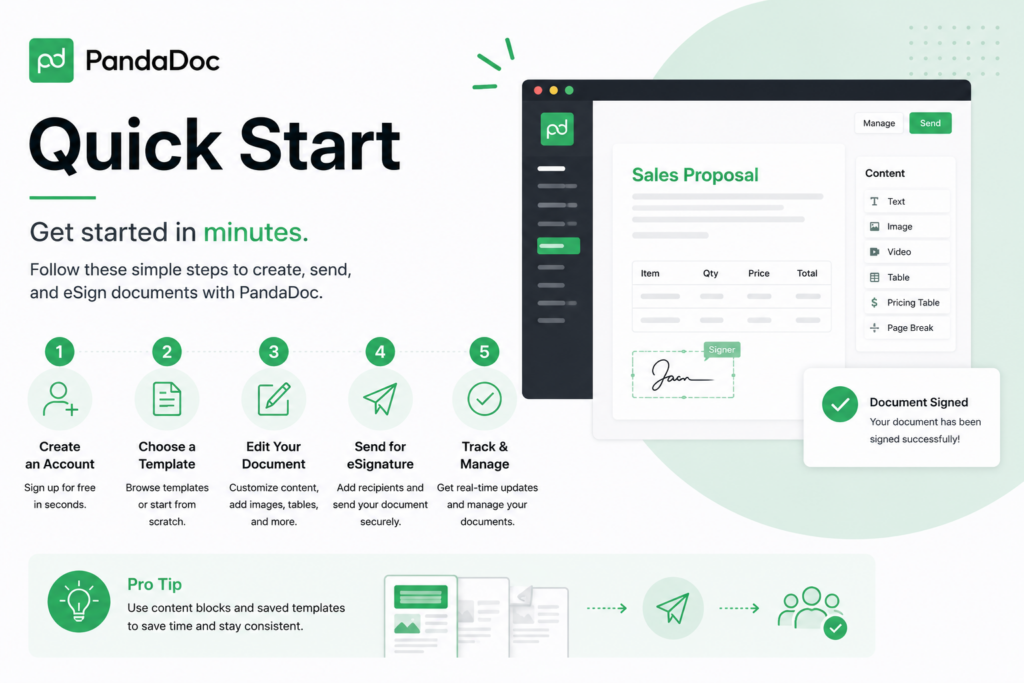
Step 1: Confirm PandaDoc Is the Right Fit Before You Buy
Be honest about your document volume. If you’re sending fewer than a handful of documents a month and only need signatures, reviewers are direct that you’ll likely overpay — a simpler e-signature tool may serve you better. If you’re sending proposals regularly and want workflow automation, CRM integration, or payment collection built in, PandaDoc’s feature set starts to earn its cost.
Step 2: Read the Pricing Page Carefully — Twice
Given the well-documented confusion between annual and monthly figures, confirm which billing cycle you’re viewing before comparing tiers, and get a specific quote in writing for your seat count rather than relying on the marketing page’s headline numbers.
Step 3: Set Up Your Account and Explore Templates
Create your account and browse the template library for your specific use case — sales proposal, service contract, HR offer letter. Starting from a relevant template is significantly faster than building your first document from a blank page.
Step 4: Build Your Content and Image Library
Upload the assets you’ll reuse constantly — your logo, standard terms and conditions, case studies, pricing tables — into PandaDoc’s content library so future documents can be assembled rather than rewritten each time.
Step 5: Connect Your CRM and Payment Tools
If you’re on Business tier or above, connect Salesforce, HubSpot, Stripe, or PayPal as relevant to your sales process. Given reported integration reliability issues, test each connection thoroughly with a real (low-stakes) document before relying on it for a high-value deal.
Step 6: Configure Approval Workflows
If multiple people need to sign off before a document goes to a client — a manager approving pricing, for instance — set up approval rules now rather than routing approvals manually over email.
Step 7: Send a Test Document and Verify Delivery
Given the reported spam-folder issue, send a test document to an external email address you control and confirm it lands in the inbox, not spam. If you’re sending anything time-sensitive, get in the habit of a quick follow-up message outside PandaDoc confirming the document was received.
Step 8: Track and Follow Up Using Document Analytics
Use PandaDoc’s tracking to see when a document is opened and how long a recipient spends on each section — this data tells you when to follow up and which parts of your proposal are actually getting read.
Tips & Tricks: Getting More Value from PandaDoc
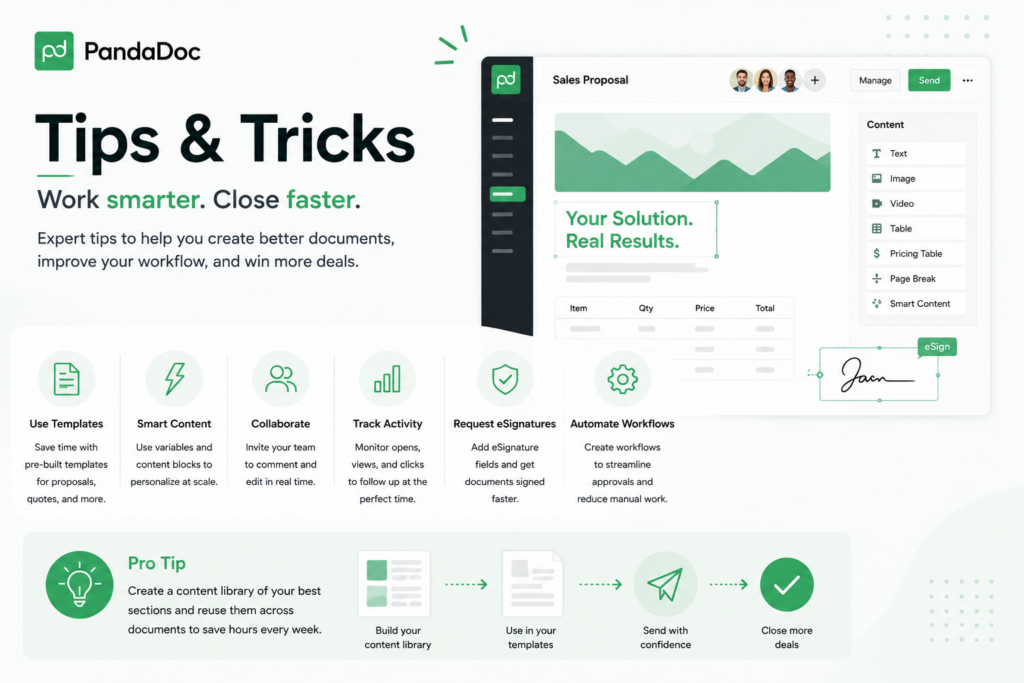
Build Reusable Blocks Before You Need Them
Invest time upfront turning your most common proposal sections — pricing tables, service descriptions, terms — into content library blocks. The time this saves compounds every time you send a new document instead of rebuilding from scratch.
Use Conditional Fields to Cut Manual Editing
If you’re on a tier with conditional logic, set up rules so specific products or services automatically pull in the right content blocks and pricing. This is exactly the kind of automation one reviewer wished for — check whether your current tier already supports it before assuming you need to upgrade.
Don’t Rely on Email Delivery Alone for Urgent Documents
Given documented spam-folder issues, pair any time-sensitive document send with a direct message or phone call letting the recipient know to expect it. A missed proposal because of a spam filter is an easily avoidable loss.
Double-Check Required Fields Before Sending
Since at least one reviewer reported a document sending successfully despite unfilled variables, get in the habit of previewing the final document yourself before it goes out, rather than trusting the system to catch every gap.
Match Your Tier to Your Actual Document Volume
Revisit your plan periodically against real usage. If you’re consistently hitting Launch’s document cap and paying overage fees, Starter’s unlimited documents may already be cheaper. If you’re not using Business-tier CRM integrations or deal rooms, you may be paying for capability you don’t need.
Use Analytics to Improve Your Proposals, Not Just Track Them
Document open and time-spent data isn’t just for follow-up timing — look for patterns across multiple proposals. If recipients consistently skip a section, that’s a signal to shorten or restructure it, not just a curiosity.
Confirm Support Coverage Before You Need It
Since phone support is a paid add-on, know in advance what support channel you have access to on your plan, so a signature issue during a time-sensitive deal doesn’t turn into an unexpected bottleneck.
Final Thoughts
PandaDoc delivers exactly what its strongest reviews describe: a genuinely complete document workflow — creation, approval, signature, and payment — that saves real time for sales and growing teams sending proposals regularly. The consistent, well-documented caveats are just as important: a confusing pricing page, real overkill for light or occasional users, and a handful of reliability rough edges around integrations and email delivery. If your business sends proposals or contracts often enough to feel the pain of manual document chasing, PandaDoc’s automation and CRM integration can genuinely pay for itself. If you just need occasional signatures, take the reviewers’ advice and look elsewhere first.