Durable AI Website Builder: From Zero to Live Website in 30 Seconds — Full Review, Setup Walkthrough, and Growth Tips
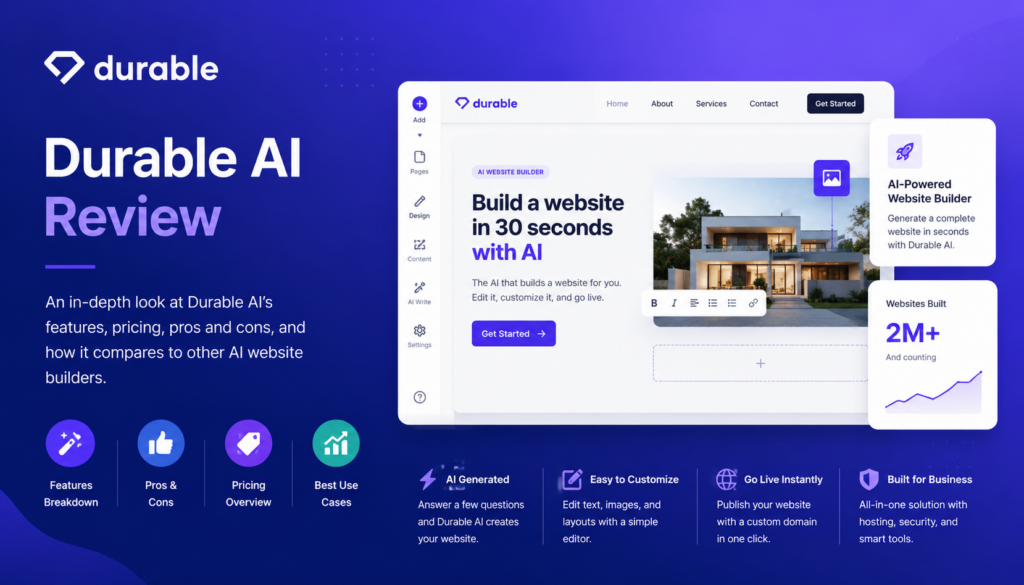
For a lot of small business owners, “I need a website” sits on the to-do list for months. Traditional builders still demand hours of template hunting, copywriting, image sourcing, and fiddling with layouts before anything goes live. Durable takes a radically different approach: answer three questions about your business, wait about 30 seconds, and the AI generates a complete, mobile-responsive website — copy, images, contact form, and hosting included.
That’s a bold pitch, and Durable has grown fast on the strength of it, now claiming more than 3 million business owners and over 11 million generated websites. But speed always comes with trade-offs, and the reviews online are candid about what those are. In this article, we’ll break down what Durable actually offers, what professional reviewers and real customers are saying, how to launch your site step by step, and the tips that help you turn a 30-second website into a genuine business asset.
What Is Durable and Who Is It Built For?
Durable, founded in 2022, describes itself less as a website builder and more as an all-in-one “AI business builder.” The website generator is the front door, but the platform bundles a surprising amount behind it: a built-in CRM for managing leads and customers, professional invoicing with Stripe payment processing, an AI marketing suite that drafts blog posts, social content, and Google Ads copy, AI-generated branding assets like logos and color palettes, built-in analytics, and an AI assistant that understands your business context.
The generation flow is the signature feature. You enter your business type, name, and location, and the AI selects a layout, writes relevant copy, pulls appropriate images from a stock library of over 10 million photos, and assembles a multi-page site with a contact form and SEO-ready structure. From there you refine everything in a visual drag-and-drop editor — inline text editing, image swapping, section reordering, theme and font controls — with zero coding required. In fact, there’s deliberately no HTML, CSS, or JavaScript access at all.
Hosting is handled automatically on Cloudflare’s global network, which means SSL encryption, DDoS protection, firewall security, and fast content delivery are included on every plan, even the free one. Durable’s newest differentiator is a GEO (generative engine optimization) tool that tracks whether AI services like ChatGPT, Perplexity, and Google’s AI Overviews actually cite your business — a forward-looking feature as more customers find local businesses through AI assistants instead of traditional search.
Pricing is straightforward compared to most software: a free plan that publishes a live site on a .durable.site subdomain, a Launch plan around $22 per month that adds a custom domain and removes Durable branding, and a Grow plan around $85 per month with daily GEO tracking and expanded business tools. Yearly billing saves roughly 15%, and there’s a 30-day money-back guarantee.
The target customer is unambiguous: solopreneurs, freelancers, local service businesses, and first-time site owners who need a professional web presence fast and would rather run their business than learn web design.
Durable Review: What Reviewers and Real Customers Are Saying
We looked at professional evaluations from TechRadar, Cybernews, HostAdvice, and several independent hands-on reviewers, alongside verified customer feedback on Trustpilot. The consensus is unusually clear for a software product: Durable does exactly what it promises, brilliantly — as long as what it promises is what you actually need.
The Professional Verdict
TechRadar calls Durable one of the more feature-rich AI website generators on the market, praising its quick and easy site creation, built-in AI marketing tools, and good customer service, while flagging limited customization, occasional AI-content accuracy concerns, and insufficient third-party integrations. Its verdict: excellent for small businesses, probably not enough for professional web designers.
Hands-on reviewers echo the pattern. A Cybernews tester who spent two weeks on the platform found the generation “impressively fast and beginner-friendly” with solid business tools built in, but considered the design flexibility limiting for brand-focused sites and the pricing steep relative to more established competitors. HostAdvice’s testing highlighted genuinely strong technical performance — a 90 desktop PageSpeed score with first contentful paint at 0.7 seconds — and concluded the whole experience “hinges on how much you value convenience over deep customization.” One independent reviewer noted a subtler strength: Durable generates sites that closely match the business description you give it, which is rarer among AI builders than you’d expect.
On value, comparison reviewers point out the math honestly: Wix and Squarespace start a few dollars cheaper at the entry tier, so Durable’s pricing only wins if you actually use the bundled CRM, invoicing, and AI tools that would otherwise be separate subscriptions. One analysis estimated the Launch plan can replace a builder, a CRM, invoicing software, and a domain for a combined savings of $180–$400 per year — for the right kind of business.
What Customers Love
Speed that actually delivers. The 30-second generation claim holds up in real-world testing, and users repeatedly describe going from signup to a live, presentable site in under an hour — one documented walkthrough went from signup to sending a first invoice in 45 minutes. For business owners paralyzed by the blank page, reviewers say eliminating that initial hurdle is Durable’s single greatest strength.
Standout customer support. This is the loudest theme in positive Trustpilot reviews. Customers praise fast response times, accurate guidance, and a support team willing to jump on video calls — one reviewer described getting helpful, personal support at six in the morning and going from “never opening the app again” to a restored fan. Reviewers note this level of support is uncommon at this price point, and Durable’s Trustpilot rating has hovered in the strong 4.7–4.8 range.
All-in-one convenience. Users like running their site, leads, invoices, and marketing content from one dashboard instead of stitching together four subscriptions. Contact form submissions flow straight into the CRM automatically, and the Stripe-powered invoicing works out of the box.
Continuous improvement and fair pricing. Long-term customers on Trustpilot describe watching the feature set improve rapidly, calling it strong value for the money, and the genuinely free plan — live site, unlimited traffic, secure hosting — earns goodwill that competitors’ trial-only models don’t.
What Customers Complain About
Design ceilings. The most consistent criticism across every source. Customization is basic by design: you can adjust themes, fonts, colors, and sections, but you cannot touch code, and sites can feel template-similar. Businesses that need a highly unique, brand-forward digital experience will hit the walls quickly.
Basic SEO and limited integrations. Several reviewers describe the built-in SEO controls as shallow, with limited third-party integrations for advanced marketing stacks. One frustrated Trustpilot reviewer reported persistent search indexing and visibility problems that support couldn’t resolve, and advised buyers to test their organic search results carefully rather than relying on marketing claims. If organic search is your primary growth channel, budget for extra SEO work or verify performance during the free tier.
No real ecommerce. Durable can take payments through invoicing and Stripe, but it is not an online store platform — there’s no product catalog, cart, or inventory system. Product sellers should look at Shopify or Wix instead.
AI content needs a human pass. The generated copy is a strong starting point, but reviewers caution it can be generic or occasionally inaccurate. Publishing it unedited is the most common mistake new users make.
The Bottom Line
Durable earns its reputation as the fastest path from nothing to a live business website, backed by unusually good support and a genuinely useful bundle of business tools. Its limitations — design depth, SEO sophistication, ecommerce, integrations — are real but largely intentional trade-offs for simplicity. For solopreneurs and service businesses, it’s a legitimately strong value. For design-driven brands or product sellers, it’s the wrong tool, and reviewers say so plainly.
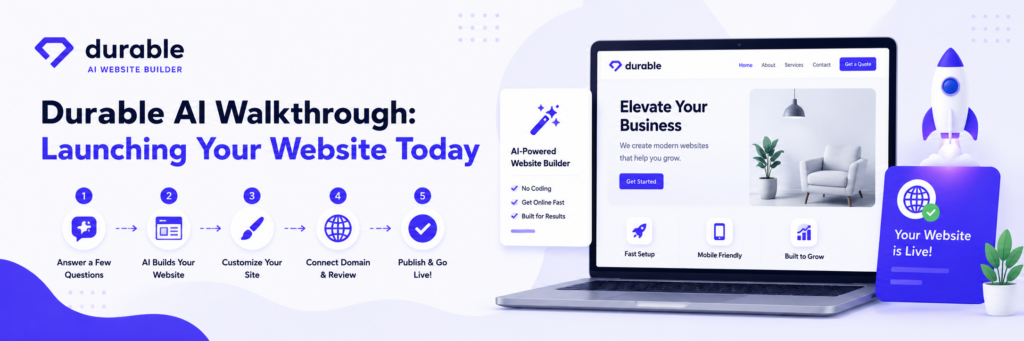
Setup Walkthrough: Launch Your Durable Website Today
One of Durable’s genuine advantages is that the setup guide fits in a lunch break. Here’s how to do it properly rather than just quickly.
Step 1: Generate Your First Draft — Free
Go to Durable’s site and enter your business type, name, and location. In about 30 seconds you’ll have a complete draft site. Don’t overthink this step; generation is free and unlimited, so if the first result misses the mark, regenerate or adjust your business description. A more specific business type (say, “residential landscape design” instead of “landscaping”) produces noticeably better copy and imagery.
Step 2: Rewrite the AI Copy in Your Voice
This is the highest-value 30 minutes you’ll spend. Go section by section and replace generic AI phrasing with specifics only you can provide: your years in business, your service area, your actual differentiators, real customer results. Use the built-in AI rewriting tools to iterate, but make sure the final text sounds like you. Swap any stock photos of “a” business for photos of your business wherever possible — it’s the single biggest trust signal for local customers.
Step 3: Tune the Design Within Its Limits
Adjust your color palette to match your brand (or generate a logo and palette with Durable’s branding tools if you don’t have one), pick fonts, and reorder or add sections — services, testimonials, FAQ, about. You won’t get pixel-level control, so aim for clean and consistent rather than fighting the platform.
Step 4: Connect a Custom Domain
Upgrade to a paid plan and either buy a domain through Durable or connect one you already own. The platform handles DNS configuration and SSL automatically. A custom domain also removes Durable branding from your site — worth it immediately for credibility.
Step 5: Set Up the Business Tools
Turn on the CRM so contact form leads are captured automatically, and connect Stripe if you’ll invoice clients (note the standard 2.9% + $0.30 processing fee). Fill out your business details completely — the AI assistant and marketing tools draw on this context for everything they generate later.
Step 6: Handle the SEO Basics Yourself
Review every page’s title and meta description, name your images descriptively, and make sure your city and service keywords appear naturally in headings and copy. Then submit your site to Google Search Console and request indexing — given the indexing complaints some users report, verifying that Google actually sees your pages is not a step to skip.
Step 7: Publish and Verify on Real Devices
Hit publish, then check the live site on your phone, a desktop, and ideally a friend’s device. Test the contact form end to end and confirm the lead lands in your CRM. Total elapsed time for all seven steps: typically an afternoon, with most of it spent on Step 2 — exactly where it should be.
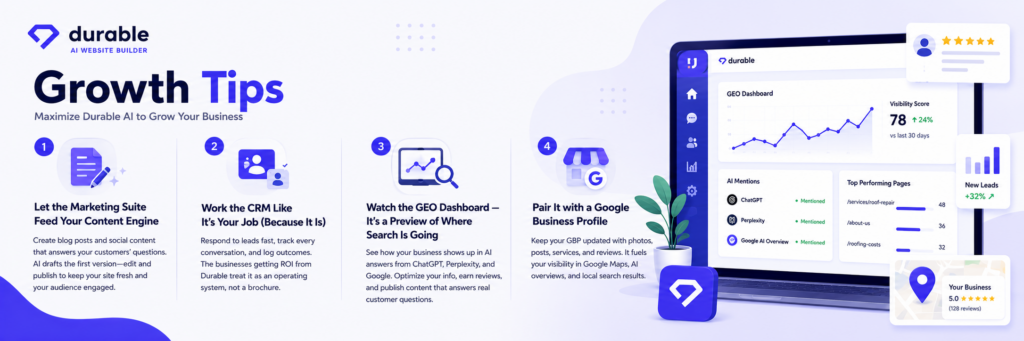
Growth Tips: Turning a 30-Second Website into a Customer Machine
Let the Marketing Suite Feed Your Content Engine
A website without fresh content stalls. Use Durable’s AI marketing tools to draft a blog post or two per month targeting the questions your customers actually ask (“how much does X cost in [your city]” is a perennial winner), plus social posts to distribute them. Edit everything before publishing — AI drafts are raw material, not finished goods — but let the tools kill the blank page for you the same way the builder did.
Work the CRM Like It’s Your Job (Because It Is)
Most small businesses lose leads to slow follow-up, not bad websites. Check the CRM daily, respond to form submissions within hours, and log outcomes so you know which services and pages generate real inquiries. The businesses getting ROI from Durable are the ones treating it as an operating system, not a brochure.
Watch the GEO Dashboard — It’s a Preview of Where Search Is Going
Durable’s generative engine optimization tracker shows whether ChatGPT, Perplexity, and Google’s AI Overviews cite your business. As more customers ask AI assistants for local recommendations, this visibility matters. Improve your odds the same way you would for classic local SEO: complete business information, consistent name/address/phone details, genuine reviews, and content that directly answers common customer questions.
Pair It with a Google Business Profile
Durable handles your website; a free Google Business Profile handles the map pack, reviews, and local discovery. Link the two, keep hours and photos current, and ask happy customers for reviews. For local service businesses, this combination outperforms either piece alone.
Invoice Through the Platform to Close the Loop
Sending invoices from the same system that captured the lead gives you a clean picture of which website inquiries turn into paid work. That attribution tells you which pages and services to feature more prominently — a small analytics habit that compounds.
Know When You’ve Outgrown It
Durable’s sweet spot is the launch-and-grow phase. If you eventually need a full online store, deep design control, or advanced marketing integrations, plan a graduation path to Shopify, WordPress, or Wix rather than fighting the platform’s ceilings. Until then, the time you’re not spending on web maintenance is time spent on actual customers — which is the entire point.
Final Thoughts
Durable is that rare piece of software whose marketing claim — a real website in 30 seconds — survives contact with reviewers and customers alike. The honest caveats are just as consistent: limited design depth, shallow SEO tooling, no true ecommerce, and AI copy that needs your fingerprints on it. If you’re a solopreneur or local service business that needs to look professional online this week, generate a free site, spend an afternoon making it yours, and let the built-in CRM and marketing tools carry their weight. Just go in knowing what it is: the fastest on-ramp to the web available today, not the last website platform you’ll ever need.