
Best AI Customer Service Software for Small Businesses
Not long ago, an “AI chatbot” meant something that could answer three canned questions before quietly handing you off to a human anyway. That’s genuinely changed — the tools below can resolve real tickets and hold a conversation worth having, only looping in a person when it actually makes sense. What hasn’t changed is that “AI customer service software” still means a few pretty different things depending on what you’re bolting it onto. Below is based on our own research into each vendor’s pricing and features, plus what shows up repeatedly across G2, Capterra, and Trustpilot once the novelty of a new tool wears off.
Short on time? Zendesk is the safest pick if you need a full AI-powered helpdesk and can afford it. Tidio is the easiest to get running today if you’re small and just want a smart chat widget. Everyone else below fits somewhere more specific.
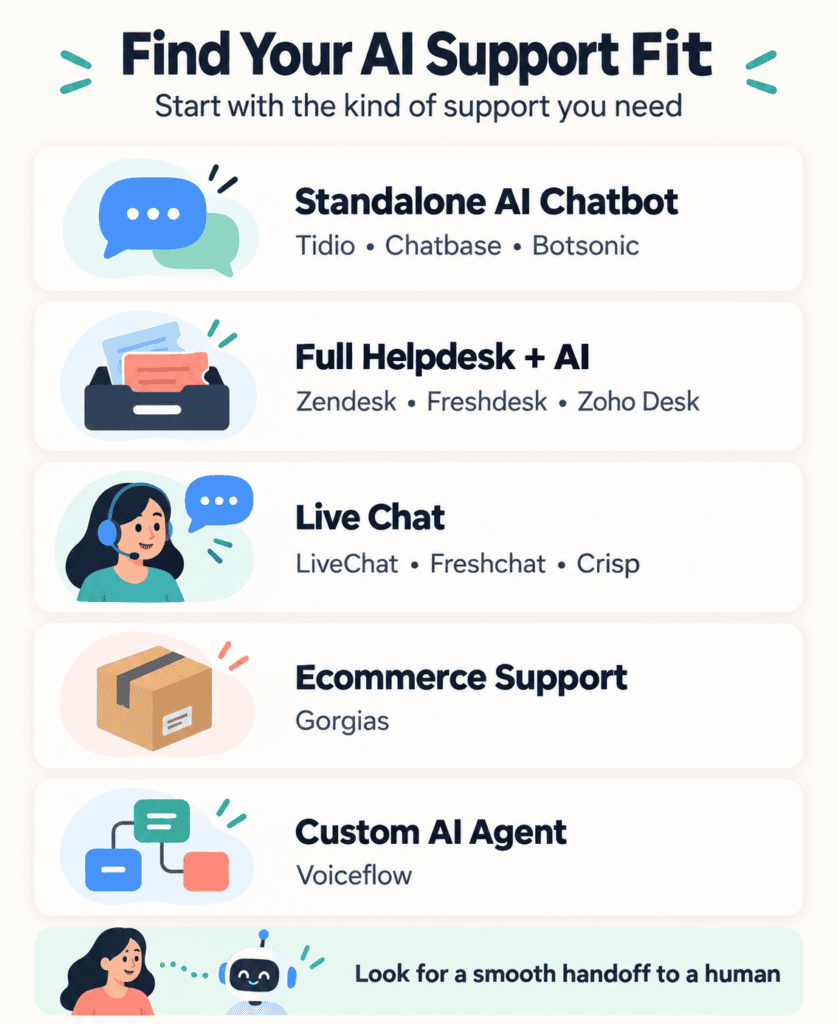
Route One: Bolt a Chatbot Onto Your Existing Site
This is the lightest lift — you’re not replacing a support system, just adding a smarter front door to it. Tidio leans hardest into this for small teams specifically; its Lyro AI feature is built to be running within a day, without a dedicated support person configuring it, which matters if support is something the founder or one generalist employee handles between other jobs. Chatbase takes a more hands-on approach, training a bot directly on your own docs and site content, which appeals more to a technically comfortable team that wants tighter control over what the bot actually says rather than trusting a more generic out-of-the-box setup.
Botsonic and Landbot both let you design the conversation visually rather than writing rules line by line — Botsonic ships closer to ready-to-deploy, Landbot’s drag-and-drop canvas gives you more control if you want the flow to feel custom. If Instagram DMs and WhatsApp matter as much as your website, ManyChat is worth a separate look, since it treats those channels as the main event rather than an afterthought.
Route Two: Replace Your Whole Support Stack
This is the bigger commitment — a real ticketing system with AI layered into the actual workflow, not just the front-end chat. That distinction matters more than it sounds: a ticketing system means assignment rules, SLAs, and reporting that a standalone chatbot simply doesn’t have anywhere to put. Zendesk is the name most support teams already know, and its AI agent tools have gotten genuinely good at resolving tickets rather than just suggesting a canned reply for a human to approve. Freshdesk covers a lot of the same ground through its Freddy AI features at a price a smaller team can actually justify without a procurement conversation.
Zoho Desk is the right call specifically if you’re already living in the Zoho ecosystem, since its AI assistant works across those other products rather than in isolation. HubSpot’s Service Hub makes similar sense if your marketing and sales already run through HubSpot. And if all of that sounds heavier than you need, Help Scout skips most of the enterprise complexity for a shared-inbox feel a small team can learn in an afternoon.
Route Three: Keep It Simple — Just Better Live Chat
Sometimes the honest answer is that you don’t need an AI agent at all — you need a dependable chat widget with AI assistance as a feature, not the entire pitch, especially if your support volume is modest and predictable rather than high-volume and repetitive. LiveChat has been doing this long enough to have a mature core product that doesn’t feel like it’s chasing a trend. Freshchat is the natural fit if you’re already using Freshdesk, and Crisp tends to appeal to smaller teams that want something modern without much of a learning curve for whoever’s staffing the chat that day.
Route Four: You Sell Products, So Support Means Order Status
Gorgias exists because “where’s my order” is a different problem than general support, and it’s built specifically to pull shipping details and return eligibility straight from your store — mostly Shopify — into the conversation. A general helpdesk can be configured to do some of this. Gorgias just starts there.
Route Five: You Want to Build Something Nobody Else Has
Every tool above expects you to configure it. Voiceflow expects you to design it — a canvas for building a custom conversational agent, voice or text, from scratch. Wrong choice if you want something live this afternoon. Right choice if a developer on your team (or working for you) wants full control over how the thing actually behaves.
The Part That Actually Matters Later
The feature that sells you on day one usually isn’t the one that matters six months in. What matters more: what happens the moment the AI genuinely doesn’t know the answer — does it hand off cleanly with context intact, or leave the customer looping? How much setup does the “AI” part actually require before it’s useful, versus how much it promises on the pricing page? And are you accidentally buying two overlapping tools — a standalone chatbot plus a full helpdesk — without a clear line between what each one is supposed to do?
None of the products above were put through a live support queue for this guide specifically — this is built from vendor documentation and the patterns in public reviews, and any deeper, hands-on testing AppFinderX has done shows up in that product’s own review, not here. If you’re weighing AI tools across more than just support, the AI-powered software hub covers the wider category, and the customer service and support hub includes the non-AI-specific tools we haven’t covered here.

